Blazor framework + Fluent UI components for Dataverse

From zero to portal hero in under 15 mintutes!

Build smarter, faster, and cleaner with Power Portals Pro—a framework of tools and components designed to supercharge Microsoft Dataverse. Skip the complexity and launch a fully working custom portal in record time, without sacrificing flexibility, scalability or performance.

  • Blazor + Fluent UI
  • Metadata-driven validation
  • Forms + sub-grids
  • ASP.NET Core Identity auth
  • No Power Pages required
Blazor Fluent UI
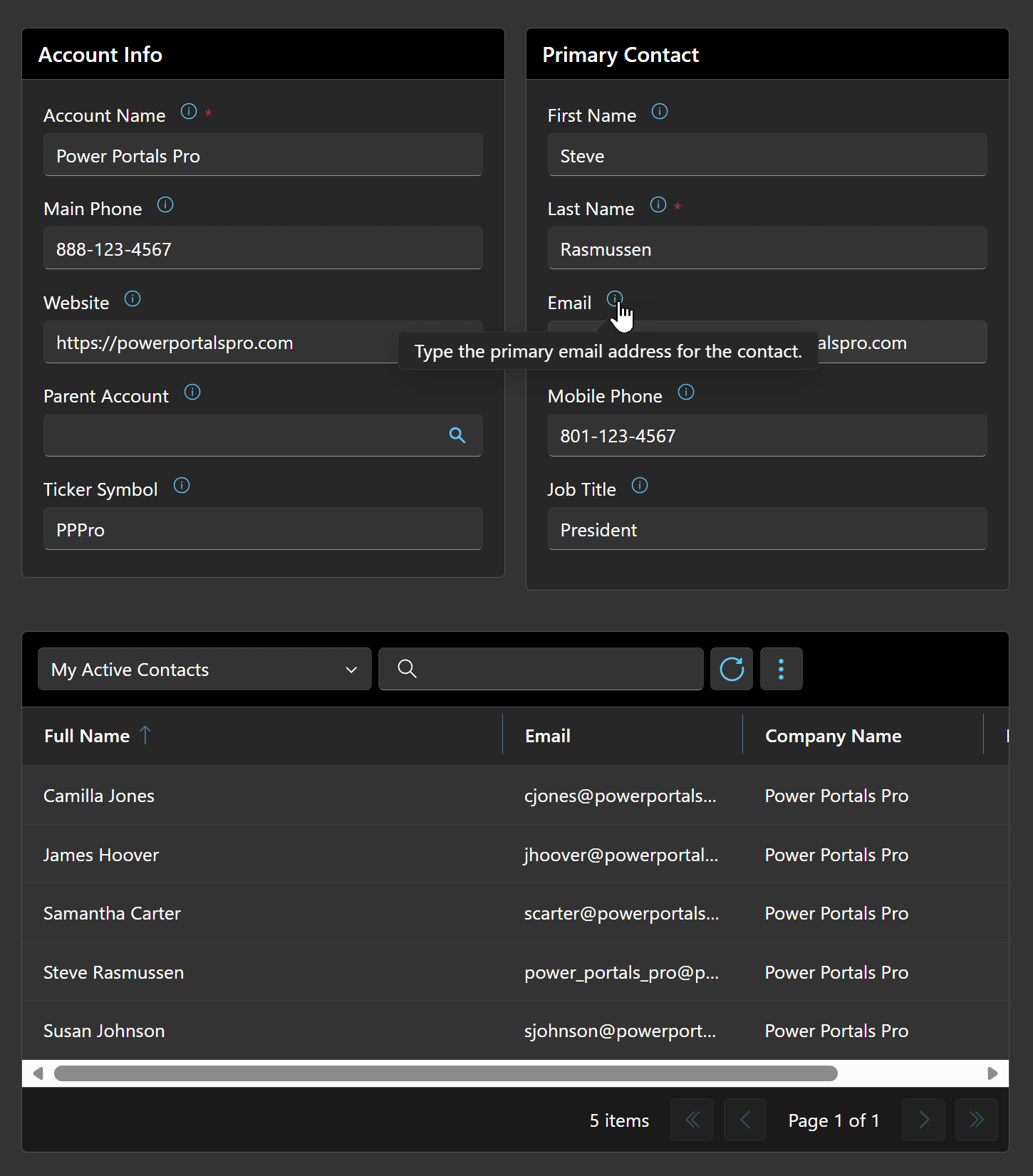
Power Portals Pro portal screenshot showing a Dataverse-backed form and sub-grid
Power Portals Pro screenshot

Build custom Dataverse portals fast—with metadata-driven forms and grids.

Power Portals Pro gives you production-ready Blazor components that read and save form data back to Microsoft Dataverse. Controls configure themselves using Dataverse metadata (labels, tooltips, required/constraints), and the framework makes localization and translation straightforward.

From This:

<RecordContext/>
  <Section/>
    <SectionColumn HeaderText="Account Info"/>
      <ColumnEdit ColumnName="name" //>
      <ColumnEdit ColumnName="telephone1" //>
      <ColumnEdit ColumnName="websiteurl" //>
      <ColumnEdit ColumnName="parentaccountid" //>
      <ColumnEdit ColumnName="tickersymbol" //>
    </SectionColumn/>
    <SectionColumn HeaderText="Primary Contact"/>
      <LookupRecordContext ColumnName="primarycontactid"/>
        <Section/>
          <ColumnEdit ColumnName="firstname" //>
          <ColumnEdit ColumnName="lastname" //>
          <ColumnEdit ColumnName="emailaddress1" //>
          <ColumnEdit ColumnName="mobilephone" //>
          <ColumnEdit ColumnName="jobtitle" //>
        </Section/>
      </LookupRecordContext/>
    </SectionColumn/>
  </Section/>
  <SubGrid RelationshipName="contact_customer_accounts" //>
</RecordContext/>

To This:

Power Portals Pro portal screenshot showing a Dataverse-backed form and sub-grid

Dataverse-aware by default

Power Portals Pro components automatically configure themselves using Dataverse metadata—so you spend less time wiring labels, tooltips, required rules, and constraints, and more time shipping portal experiences.

Authentication & authorization included

Built on ASP.NET Core Identity, with first-class support for both audiences. Internal portals let staff sign in as their own Dataverse systemuser via Microsoft / Entra ID — Dataverse security roles enforce row-, column-, and business-unit-level access automatically through CallerId impersonation, so internal sites get the same security model as a model-driven app. Customer-facing portals back users with Dataverse contacts and accept local username/password plus Microsoft Entra ID, Google, and any other ASP.NET Core provider. Both audiences can share a single portal at the same time.

Metadata-driven UI

Labels, tooltips, required flags, min/max, and length constraints come from Dataverse—consistent across pages.

Read + save forms to Dataverse

Build pages that load records and persist changes back to Dataverse using a clean, reusable pattern.

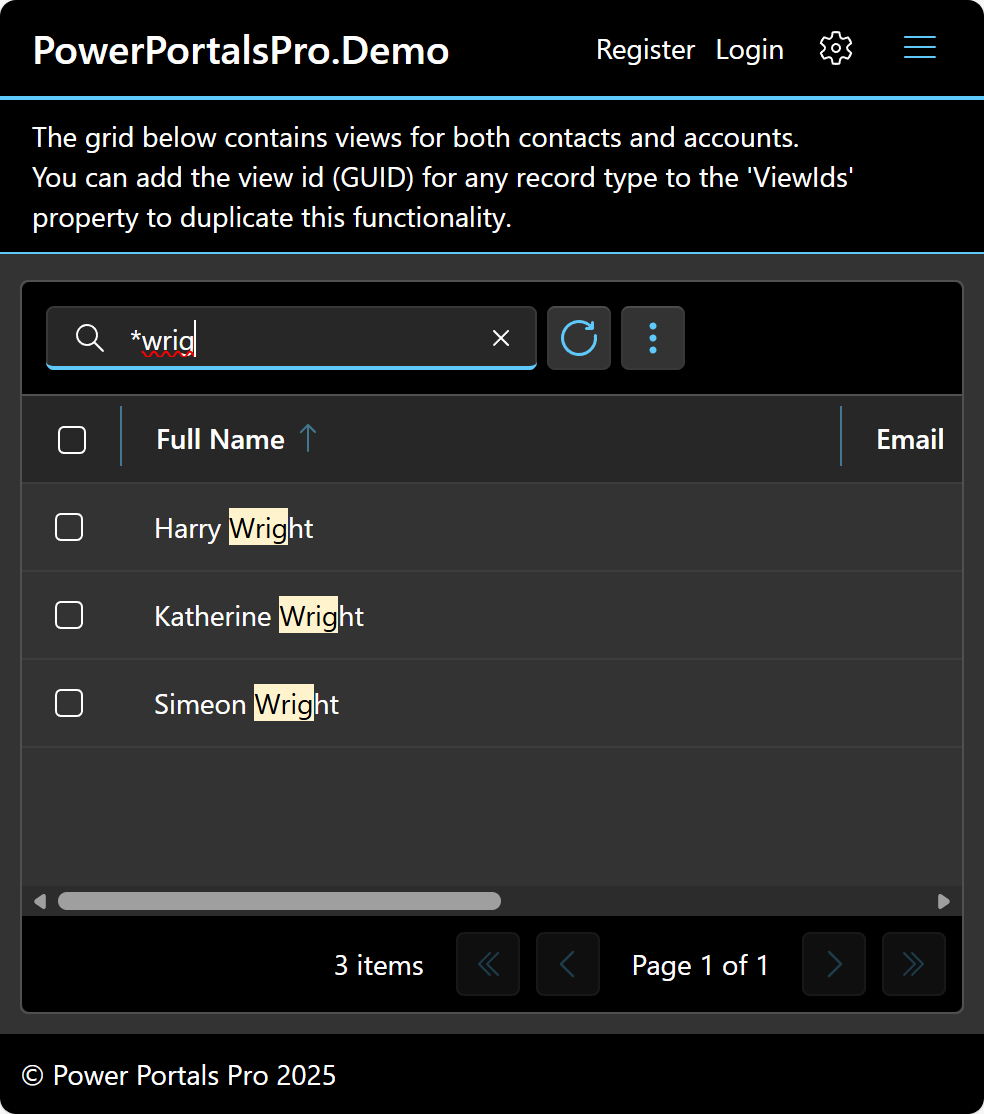
Grid + sub-grid support

A configurable grid component that can act as a sub-grid to display related records.

Atomic saves + full Blazor flexibility

When users save, Power Portals Pro persists all changes—form fields plus grid/sub-grid edits—in a single Dataverse transaction, so updates are atomic (everything succeeds or everything rolls back). And because you’re building a true custom portal on ASP.NET Core Blazor, you can use the full .NET ecosystem and any capabilities available to a standard Blazor project (libraries, middleware, authentication providers, logging, background services, and more).

Blazor + Fluent UI

Modern component model, enterprise-friendly UI system, and a clean developer experience.

Validation that matches Dataverse

Constraints and required rules flow through so forms behave the way Dataverse expects.

Localization & translation ready

Built-in capabilities that make it easier to plan for multiple languages and translated experiences.

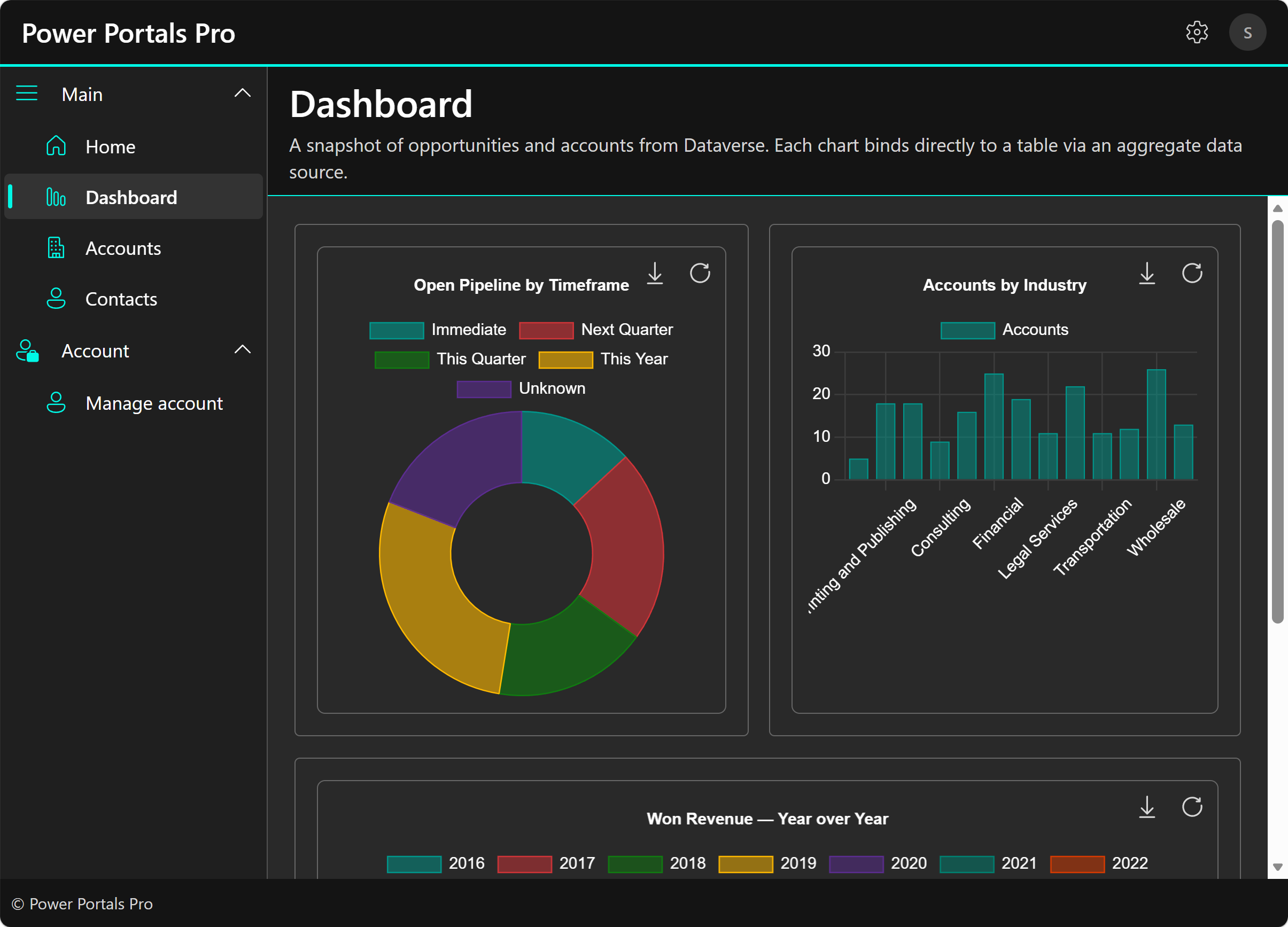
Interactive charts

Theme-aware bar, line, pie, doughnut, radar, and polar area charts with click events, Dataverse aggregate data sources, and year-over-year comparisons—all driven by simple property configuration.

Build internal portals, not just customer portals

Power Portals Pro isn't only for customer-facing sites. Build internal employee portals, departmental tools, and back-office sites where staff sign in as their own Dataverse user — no duplicate Contact record, no parallel security model, no rebuilding of permission rules you already set up in Dataverse. A Microsoft / Entra ID sign-in is matched against the systemuser table; if it resolves, the Dataverse connection impersonates that user via CallerId and their existing security roles enforce row-, column-, and business-unit-level access automatically. The same framework also handles customer-facing contact sign-in, so you can build internal sites, customer portals, or both on a single codebase. Admins can even link a single Microsoft sign-in to both a systemuser and a contact and flip between them in-session for testing the customer-side experience without losing admin access.

How it works

A clean flow from Dataverse metadata to a polished, working portal page.

1) Point at your table/columns

Bind editors to Dataverse entities and attributes (columns).

2) Let metadata drive the UI

Editors pull label/tooltips and enforce required + constraints automatically.

3) Save back to Dataverse

Submit changes reliably with patterns that match Dataverse expectations.

Power Portals Pro vs Power Pages

Both build portals on Dataverse — here's how they compare.

Feature Power Portals Pro Power Pages
Technology Blazor (Server, WebAssembly, or Auto) / C# Low-code / Liquid templates
UI Framework Microsoft Fluent UI Blazor Bootstrap (customizable)
Hosting Self-hosted (Azure, any cloud) Microsoft-hosted
Source Control Full codebase in Git Configuration-based
Form Components Metadata-driven typed editors Visual form designer
Data Grids MainGrid & SubGrid with inline editing, views, paging Lists with basic configuration
Charts ✓ Theme-aware charts with Dataverse data sources, click events, aggregates Basic Power BI embedding
Transactional Saves ✓ Multi-record atomic transactions
Record-Level Security ✓ Code-driven permission handlers Table permissions (config-based)
Internal Portals & Sites ✓ Build employee portals, internal tools, and back-office sites where staff sign in as their own Dataverse user — Dataverse security roles enforce access via CallerId impersonation, no parallel identity model needed Designed primarily for external-facing portals — internal staff sign in as Contacts (parallel identity)
Server-Side Interceptors ✓ Before/after hooks on all operations ✗ (requires plugins)
Localization ✓ Full control over tables, columns, views, choices, and custom strings Limited to Dynamics language packs; views and choices difficult to localize
N:N Relationship Editor ✓ ManyToManyLookupEdit component ✗ (requires custom development)
Offline Development ✓ Full local dev experience ✗ Requires cloud connection
CI/CD Pipelines ✓ Standard .NET build & deploy Power Platform pipelines
Custom Business Logic C# — unlimited flexibility Power Automate / Plugins
Pricing Model Flat monthly license fee Per-user / per-site with capacity packs

Simple pricing

$349 per month. One product, continuous updates.

Power Portals Pro

Framework + components for Dataverse portals

$349 USD • per month • per portal
  • Blazor components based on Fluent UI
  • Editors for common Dataverse field types
  • Grid + sub-grid for related records
  • Interactive charts with Dataverse data sources
  • Metadata-driven labels, tooltips & validation
  • Localization/translation-ready capabilities
  • Unlimited users (no "per user" licensing costs)
Purchase Now

Request a 30 day free trial

FAQ

Answers tailored to Dataverse portal builders.

What does "metadata-driven" mean here?

Editors and grids use Dataverse metadata to configure labels and tooltips, and to enforce constraints like required fields, min/max values, and length limits—so your portal stays consistent with your data model.

What UI technology is it built on?

Power Portals Pro is built on Microsoft Blazor and uses the Fluent UI design system for a modern, consistent enterprise look and feel.

Does it support related records (sub-grids)?

Yes. The grid component can be configured as a sub-grid to display related records (for example, child contacts on an account).

How do localization and translation work?

The framework includes capabilities that make it easier to design for localization and translation from day one (labels/content can be planned to vary by language and region).

Does Power Portals Pro include authentication and authorization?

Yes — and it supports two audiences out of the box. Internal portals let staff sign in as their own Dataverse systemuser via Microsoft / Entra ID, and Dataverse security roles enforce row-, column-, and business-unit-level access automatically through CallerId impersonation. Customer-facing portals back users with Dataverse contacts and accept local username/password plus external providers (Microsoft, Google, etc.) via ASP.NET Core Identity. Both audiences can share a single portal at the same time.

What login providers are supported?

Power Portals Pro supports local authentication (username/password) and external identity providers such as Microsoft Entra ID (Azure AD), Google, and other providers supported by ASP.NET Core authentication.

Can I build an internal portal for my Dataverse users with Power Portals Pro?

Yes — that's a core use case, not an afterthought. Build internal employee portals, departmental tools, or back-office sites where staff sign in as their own Dataverse systemuser via Microsoft / Entra ID. The portal looks up the signed-in user against systemuser.azureactivedirectoryobjectid and, if it resolves, impersonates that user via ServiceClient.CallerId — so Dataverse security roles enforce row-, column-, and business-unit-level access without any portal-side permission code. Your existing Dataverse role assignments are the security model. If no matching systemuser is found, sign-in falls back to the contact-based flow, so the same portal can serve internal staff and external customers at once.

Can admins test the portal as a contact while keeping admin access?

Yes — link a single Microsoft sign-in to both a Dataverse systemuser (your internal account) and a contact (a test record, or your own customer-side record), and the portal will show a chooser on first sign-in and a Switch to contact / Switch to systemuser entry in the profile menu thereafter. This is the standard pattern for verifying the contact-side experience — rendering, hidden toolbar buttons, permission-driven content — without signing out of the admin account. The chooser pick is remembered in a small per-provider-key cookie so subsequent sign-ins go straight to the last-picked identity.

Do we need to enable Power Pages? Are there Power Pages costs?

No. Power Portals Pro does not require Power Pages to be enabled in your environment. Because you’re not using Power Pages, there are no Power Pages-related licensing costs.

How is this different from Power Pages?

Power Portals Pro is a Blazor + Fluent UI framework and component set for building a custom portal that integrates with Dataverse. It uses ASP.NET Core Identity (users as Contacts, using familiar Contact fields) and does not require Power Pages to be enabled—so you avoid Power Pages licensing costs.

Ready to build Dataverse portals with less plumbing?

Start Power Portals Pro for $349/mo.

Start now

Get in Touch

Whether you're looking for technical support, have a question about licensing, or want to discuss how Power Portals Pro can meet your needs, we're here to help.

Email: For general inquiries, contact us at support@powerportalspro.com

Support Tickets: For technical issues or bug reports, please open a support ticket on our GitHub repository.

We're committed to responding promptly and helping you succeed with Power Portals Pro. For more ways to reach us, visit our Support page.